Android Development CourseLive online across India · Tamil & English · Classroom in Rasipuram, Tamil Nadu
Job-ready Android app development course — Java, Kotlin, Jetpack, Firebase — live online from anywhere in India, or in our Rasipuram classroom (Tamil Nadu).
Course overview
Android App Development Masterclass: Build Innovative Mobile Applications
Course Description:
Embark on a journey into the world of Android app development with GeekBase Technology's comprehensive masterclass. From concept to deployment, this course covers every aspect of app development, empowering you to create cutting-edge mobile applications for the Android platform. Dive into hands-on projects, expert-led sessions, and collaborative exercises to master essential tools and techniques and launch your career as an Android developer.
Key Highlights:
Target Audience:
Aspiring developers with no prior experience in Android app development.
Programmers interested in transitioning to Android app development.
Professionals seeking to enhance their mobile development skills with Android.
Mentor Support:
Learners will have access to an experienced instructor who will provide support through one on one meeting, live Q&A sessions, and email to answer questions and provide guidance throughout the course.
Learn online from anywhere in India — or in our classroom
🌐 Live online — pan India
Join live, trainer-led Android Development classes from any city or town in India. Ask questions in class, get your code reviewed and practise on GoCode between sessions.
🏫 Classroom — Rasipuram
Prefer learning in person? Our centre in Rasipuram (Namakkal district) is a short trip from Salem, Namakkal, Erode and Tiruchengode.
Curriculum
11 modulesModule 1: Introduction to Android App Development
- Overview of Android ecosystem: history, versions, and market share.
- Understanding the Android app development lifecycle.
- Setting up the development environment: Android Studio, SDK installation, and device configuration.
Module 2: Java Programming Basics
- Introduction to Java programming language: syntax, variables, data types, and control flow.
- Object-oriented programming (OOP) concepts: classes, objects, inheritance, and polymorphism.
- Writing your first Android app using Java: "Hello, World!" and basic UI components.
Module 3: Kotlin Programming Fundamentals
- Introduction to Kotlin programming language: features, syntax, and advantages over Java.
- Transitioning from Java to Kotlin: interoperability and best practices.
- Developing Android apps with Kotlin: features, extension functions, and null safety.
Module 4: User Interface Design with XML and Layouts
- Understanding Android UI components: views, layouts, and widgets.
- Creating responsive layouts using XML markup and ConstraintLayout.
- Implementing UI design principles: material design guidelines, typography, and colors.
Module 5: Activity and Fragment Lifecycle
- Understanding the lifecycle of Android activities and fragments.
- Implementing lifecycle callbacks: onCreate(), onStart(), onResume(), onPause(), onStop(), onDestroy().
- Handling configuration changes and saving instance state.
Module 6: Working with Data: SQLite and Room Database
- Introduction to SQLite database: features, CRUD operations, and transactions.
- Implementing local data storage in Android apps using SQLiteOpenHelper.
- Using Room Persistence Library: entities, DAOs, and database migrations.
Module 7: Networking and RESTful APIs
- Overview of networking in Android: HttpURLConnection, AsyncTask, and HttpClient.
- Consuming RESTful APIs: Retrofit library for efficient network requests.
- Parsing JSON data and handling responses using Gson library.
Module 8: Advanced Topics in Android Development
- Implementing advanced UI features: RecyclerView, ViewPager, and RecyclerView.
- Working with background tasks and services: IntentService, JobScheduler, and WorkManager.
- Integrating location-based services and Google Maps API.
Module 9: Material Design and UI/UX Principles
- Understanding material design principles: elevation, shadows, and animations.
- Implementing material design components: BottomNavigationView, FloatingActionButton, and CardView.
- Enhancing user experience with motion and gesture-based interactions.
Module 10: Final Project- Building a Real-World Android Application
- Applying learned concepts and techniques to develop a complete Android application.
- Writing unit tests and instrumented tests for Android apps.
- Debugging and troubleshooting common issues in Android development.
Module 11: Portfolio Development and Career Guidance
- Building a professional portfolio showcasing your Android development projects.
- Crafting a compelling resume and cover letter for Android development roles.
- Exploring career paths in Android development and job search strategies.
Certification
Course Certification:
Upon successful completion of the course, there will be cumulative test conducted and students who scored above 60% marks will receive a certificate of completion from GeekBase Technology, which can be used to showcase their newly acquired Android app Development skills.
Note: Test will be a MCQ pattern and maximum two attempts allowed.
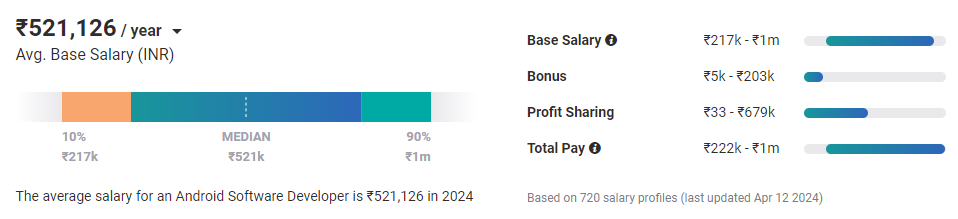
Why certified Android Developer ?
Frequently asked questions
Can I join the Android Development course from outside Tamil Nadu?
Yes. The live online batch is open to learners anywhere in India — Chennai, Bengaluru, Hyderabad, Pune, Kochi or a small town. You attend the same live classes, with the same trainers and curriculum, as the classroom batch. Classes are taught in Tamil, English.
Where is the classroom for the Android Development course?
Our classroom centre is on Bharathidhasan Street, Rasipuram (Namakkal district) — between Salem and Namakkal, and within reach of Erode and Tiruchengode.
What is the fee and duration of the Android Development course?
The course runs for 8 Weeks and the fee is ₹24,000 (regular price ₹28,000). EMI options are available — message us on WhatsApp for the current batch dates and offers.
Do I get a certificate and placement support?
Yes. You receive a course completion certificate, and placement support includes resume reviews, mock interviews and practice on GoCode, our coding and interview-prep platform.


